
🏎️💨 Back to the future – Summary of part 1
Part 1 demonstrated how root shell access was achieved on the Nokia Beacon 3.1 by physically extracting the NAND flash, dumping and analyzing the firmware, modifying it, and re-flashing it back to the device. The goal of that initial exploration was not simply to “unlock” the device, but to highlight the actual security boundaries enforced at the firmware and hardware level, and how those boundaries can be bypassed when physical access is assumed.
Several readers asked for a universal “root password” or a simple unlock method. That assumption is incorrect. There is no single shared root credential across devices. In ISP managed deployments like this, credentials are typically provisioned per-device and may be derived from manufacturing data or external provisioning systems controlled by the ISP or vendor infrastructure.
Administrative accounts (such as admin or superadmin) are separate, each governed by their own authentication mechanism and, in many cases, provisioned dynamically rather than being statically embedded in firmware. As a result, privilege escalation in this context is not about finding a generic password, but about understanding how trust is established between hardware, firmware, and provisioning systems.
In the comments from my previous article, many of you asked whether there is a simpler method to obtain shell access without the full hardware extraction process described in Part 1. The only alternative method identified involved is an exploitation of a vulnerability device, which could be used to execute system-level commands under specific conditions. However, this issue has since been addressed in the latest 2026 firmware release and is no longer exploitable on updated systems. The vulnerability is tracked as CVE-2025-9974 and was patched by the vendor.
The good news is, not all updates are pushed into all routers and maybe yours too. You have to check if it is vulnerable or not by following the procedure described later. Just cross your fingers and stay with me🤞🏻
⚠️ Keeping your device without security update is dangerous. This write-up is provided for informational and security research purposes only. The vulnerability described has been patched by the vendor in recent firmware versions, and it is not exploitable on updated systems. The intent is to document the behavior of the system and the remediation process, not to provide a method for unauthorized access.
🚀 Disable Quagga shell – Hardware method:
The Nokia Beacon 3.1 includes the Quagga shell, a restricted command-line environment intended for network administration rather than full system access. On my device, only the superadmin account provided access to this shell, and even then, the available commands were heavily restricted. While it is useful for basic diagnostics and configuration, it does not provide unrestricted access to the underlying operating system. That limitation is what motivated this research and the development of this method. This chapter it only applies to devices whose NAND firmware has already been modified as described in Part 1.
In the previous article, I successfully obtained a root shell by modifying the firmware and replacing the system’s init process with /bin/sh. However, it came with a significant drawback: because the normal initialization process never started, essential services and background processes failed to launch. As a result, the router booted into a shell, but many of its networking and management features were unavailable.
[   10.207898] ubi0 warning: ubi_open_volume.part.0: cannot open device 0, volume 3, ret -16
[   10.313320] VFS: Mounted root (squashfs filesystem) readonly on device 254:0.
[   10.320531] Freeing unused kernel memory: 448K
[   10.361003] Run /bin/sh as init process


BusyBox v1.35.0 (2023-01-03 00:24:21 UTC) built-in shell (ash)

/bin/sh: can't access tty; job control turned off
/ #Booting the router, disable quagga and start SSHd:
To start the router, I executed the command exec /sbin/init. The problem is that it also starts the Quagga services, along with many other modules and processes that I don’t need. The normal boot process also overwrites the secboot flag that I patched in the first place. As a result, if I reboot the router, it automatically restores its original state, which disables the UART again.
The second important thing I do in this script is to create another script in /tmp and I delay its execution. The script disables Quagga Shell, kills DropBear, removes root password from /mnt/etc/shadow, create new keys and restart the Dropbear (SSHd)
If you are willing to perform this part, I assume that you are already having a root shell in UART. I created a script that automate the booting if you are connected through UART, the link is below. Use `–help` for usage.
https://github.com/warber0x/NokiaBeacon3.1_Nand_Patcher/blob/main/failsafeboot.py
You have to wait for 5 min. The router will boot, the web server will be up and running and the SSH alive. If you face problems. Just leave a comment and I will check if I could help 🙂
All right !!! Your router is now really yours and you can inspect what ever you want 😎
P.S If you reboot the device yo must re-run the script again from the root shell through UART. There is no persistence for now…
🔓 Unlock your router – No UART, No Flash needed (Still in progress)
As mentioned above, this method only works on routers that have not been updated to the latest firmware. Your ISP may automatically install a firmware update, which will prevent this script from working. If you’re lucky, your router may still be running the older firmware. However, keep in mind that it will also remain vulnerable.
Don’t panic ! The attack still requires valid credentials. An attacker would first need access to your local network and then perform a man-in-the-middle (MITM) attack to capture your login credentials. To protect yourself, make sure HTTPS is enabled on your router.
This exploit only works on firmware version 2502b.18.07.A17. Nokia addressed this vulnerability in security release BBDR2503.
To verify your router’s firmware version, open the router’s login page, press Ctrl+U to view the page source, and look for the following section:
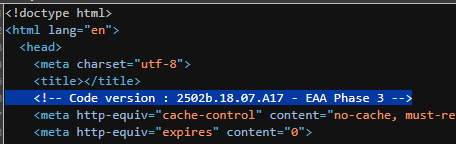
If you have firmware version 2502, I have good and bad news for you.
The good news: you will be able to hack your own router.
The bad news: your router is vulnerable. However, as mentioned above, there is no reason to panic if you are the only person testing or attacking your own device.
My tool executes commands directly on the router, disables Quagga, and enables the SSH service on port 22. The only requirement is that you provide valid router credentials as parameters. Once authenticated, the tool can activate SSHD and disable the fu**ing Quagga shell. 😉
The exploit is not ready yet. I’m working on it…
# Run the tool
python jailbreakBeacon.py admin <YourPassword>

# After that use the command to connect to ssh
ssh root@192.168.18.1🧩 Bonus : Dynamic Analysis (Reverse engineering)
Expect In the part 3 the full exploitation and I will add another chapter on how to do some live debugging, dynamic analysis and reverse engineering of ARM binaries…
Thanks for reading and stay tuned folks 😉
Categories: IoT Reverse Engineering Security Research
Part 3 when??
Hey! Does your exploit/jailbreak script use CVE-2025-9974?
What endpoint are you sending a request to, to exploit this CVE?
Could you please share the firmware dump, it would greatly help other researchers. Thanks your for sharing your research.
Nice work! Thank you for what you doing!
We all waiting a solution for Beacon 3.1 or G6!
Hey AA, I’m working on the Beacon G6. It’s super WIP, but I’ll be adding stuff here: https://github.com/Rajdave69/Nokia-Beacon-G6/
if my router firmware version is same but rebased by isp provider then how we can unlock it.
Hi Thered0ne,
Thank you for your intersting blog.
I have some questions. If we disable secure_boot in uboot env, can we booting a custom kernel/rootfs? And other question, if I purchase a beacon, will it auto update if I use it as a AP? I’m concern that this vuln will be fixed by auto update to a newer system.
Looking for your reply, thank you!
Hi!
Very technical! I like ! I m so sad because a have to devices that work only in Bridge mode . Now have an update Software version
3TN00626IJNI28(1.2601.228) that bring SFU or HGU mode swith, but when i press SFU Mode i received that “cant write”